Ship ML models to phones and edge devices in stages, watch how each version behaves, and roll back automatically when one is worse.
FleetML is self-hosted and open source under Apache-2.0, and works with any model file. Android and iOS apps get it through two SDKs, Linux machines through an agent, and the server starts with one docker compose command.
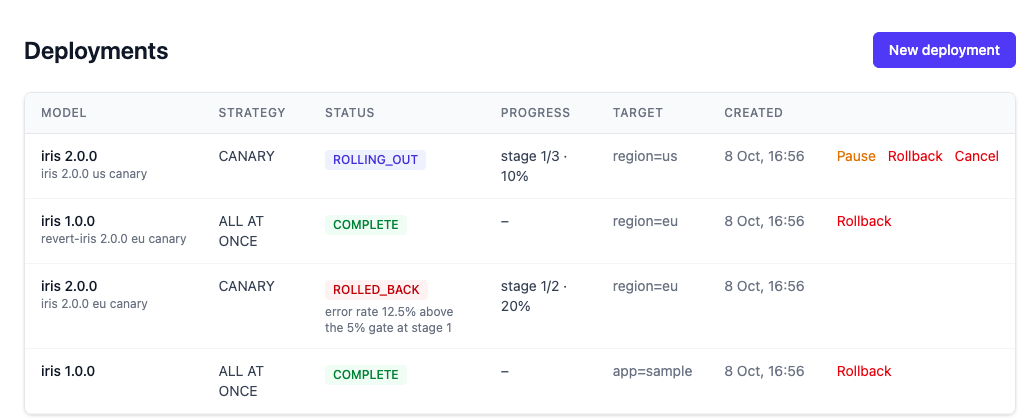
The dashboard: a canary the health gate rolled back (error rate 12.5% above the 5% gate), next to one still rolling out.
A recorded run
What a rollout looks like
scripts/demo.sh against a real server and twenty simulated devices that use the same protocol as the SDKs: the model published, the fleet on 1.0.0, then a canary of a broken 2.0.0 that the health gate rolls back. Every line below is a line the script printed; the strip follows the deployment through the states the dashboard shows.
scripts/demo.sh
▶ 1. Publish three versions of a model $ fleetml push models/iris/iris_v1.tflite --model iris --version 1.0.0 ✓ Pushed models/iris/iris_v1.tflite → iris v1.0.0 (INT8) $ fleetml push models/iris/iris_v2.tflite --model iris --version 2.0.0 ✓ Pushed models/iris/iris_v2.tflite → iris v2.0.0 (INT8) each file was sha256-verified on upload; only verified files are ever sent to devices▶ 2. Twenty devices enroll and get 1.0.0 $ fleetml simulate --devices 20 --label app=demo # simulated phones: real protocol, real downloads $ POST /api/v1/deployments {version: 1.0.0, target: app=demo} fleet: iris 1.0.0 on 20▶ 4. A canary of 2.0.0 with a health gate; 2.0.0 is broken $ POST /api/v1/deployments {version: 2.0.0, strategy: CANARY 25% -> 100%, gate: errors <= 5% over 30 events, else ROLLBACK} fleet: iris 1.0.0 on 12, iris 2.0.0 on 8 (the canary cohort only) deployment ROLLED_BACK: error rate 22.92% exceeds threshold 5.00% (11/48 events from 8 cohort devices) fleet: iris 1.0.0 on 20, nobody outside the canary ever saw 2.0.0
It needs Docker, Go and jq: ./scripts/demo.sh from a clone.
The whole run, as printed (it goes on to drift and an A/B test)
▶ Starting the dev stack and a demo server

▶ 1. Publish three versions of a model
  $ fleetml push models/iris/iris_v1.tflite --model iris --version 1.0.0
  ✓ Pushed models/iris/iris_v1.tflite → iris v1.0.0 (INT8)
  $ fleetml push models/iris/iris_v2.tflite --model iris --version 2.0.0
  ✓ Pushed models/iris/iris_v2.tflite → iris v2.0.0 (INT8)
  $ fleetml push models/iris/iris_v2.tflite --model iris --version 2.1.0
  ✓ Pushed models/iris/iris_v2.tflite → iris v2.1.0 (INT8)
  each file was sha256-verified on upload; only verified files are ever sent to devices

▶ 2. Twenty devices enroll and get 1.0.0
  $ fleetml simulate --devices 20 --label app=demo   # simulated phones: real protocol, real downloads
  $ POST /api/v1/deployments  {version: 1.0.0, target: app=demo}
  fleet: iris 1.0.0 on 20

▶ 3. Drift: the last day's latency against the week before
  latency drift for 1.0.0: NONE (PSI 0.026)
  now the devices slow down (say, after an OS update)...
  latency drift for 1.0.0: CRITICAL (PSI 8.511)
  a change into CRITICAL is sent as an alert: 1 drift alert(s) on NATS

▶ 4. A canary of 2.0.0 with a health gate; 2.0.0 is broken
  $ POST /api/v1/deployments  {version: 2.0.0, strategy: CANARY 25% -> 100%, gate: errors <= 5% over 30 events, else ROLLBACK}
  fleet: iris 1.0.0 on 12, iris 2.0.0 on 8   (the canary cohort only)
  deployment ROLLED_BACK: error rate 22.92% exceeds threshold 5.00% (11/48 events from 8 cohort devices)
  fleet: iris 1.0.0 on 20, nobody outside the canary ever saw 2.0.0

▶ 5. A/B test: 1.0.0 against the fixed 2.1.0
  $ POST /api/v1/experiments  {control: 1.0.0, treatment: 2.1.0, target: app=demo, min_sample_size: 300}
  control 1.0.0:   350 inferences, mean 34 ms
  treatment 2.1.0: 350 inferences, mean 13 ms
  Welch t-test p < 0.0001, recommendation: ADOPT_TREATMENT
  $ POST /api/v1/deployments  {version: 2.1.0, target: app=demo}
  fleet: iris 2.1.0 on 20

▶ Done in 30s (plus 17s of setup)
  The same steps work against your devices with the Android and iOS SDKs (docs/ANDROID_SDK.md, docs/IOS_SDK.md).
One line is left out: the setup line with the server's local ports.
See it on your own phone
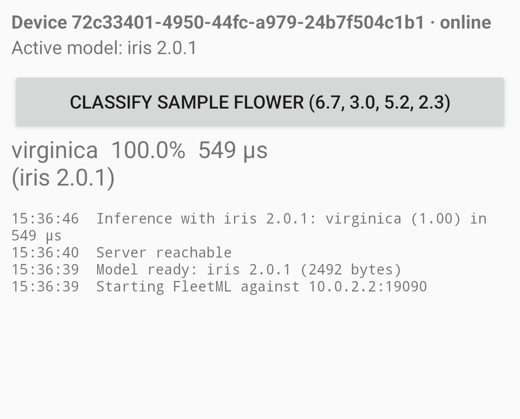
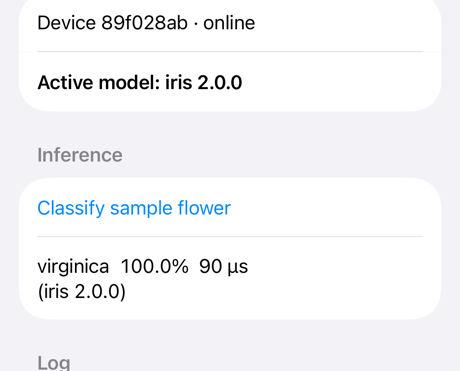
Get started with a phone in place of the Linux agent. The Android SDK is tested on a physical phone and the emulator, the iOS SDK on a physical phone and simulators.
Clean up: the app on the simulator, the build, the server and all its data.
iOS
What it does
Rollouts that stop themselves
The end-to-end tests in the repository cover every one of these.
Canary rollouts with a health gate
The gate watches the canary cohort's error rate, and optionally p95 latency, and rolls back or pauses. It looks only at the new version's telemetry from the devices the current stage exposes, so errors from devices outside the cohort never count.
A rollback, by the gate or by hand, marks the deployment ROLLED_BACK and sends devices back to the previous version, with its URL and sha256. The revert is urgent: devices fetch it on any network, and usually still have it cached as their last-known-good version.
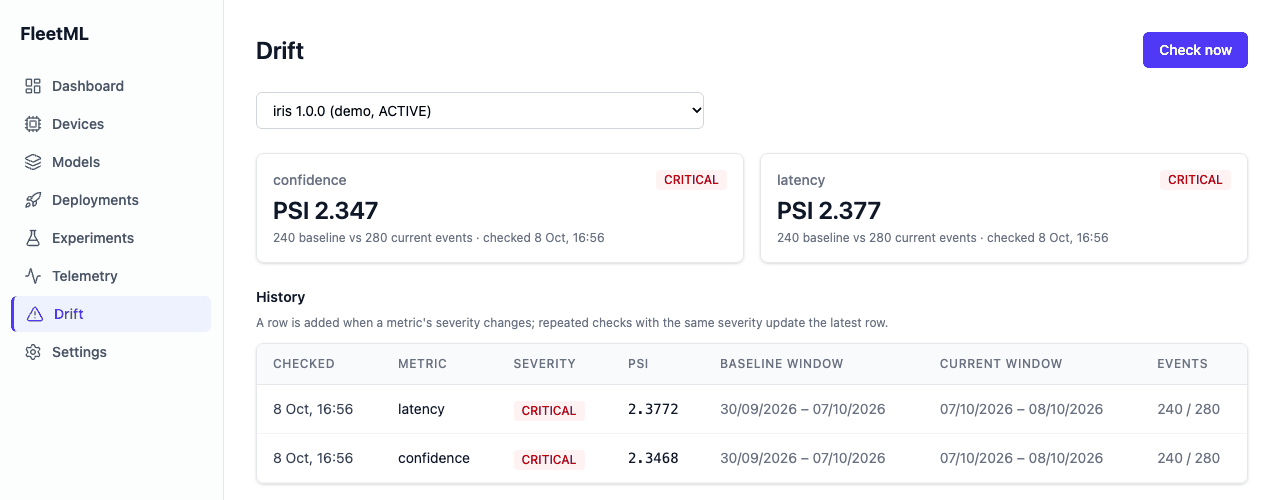
PSI on latency, confidence and input features, the last 24 hours against the 7 days before, with an alert on CRITICAL. Every check's PSI is kept, and the Drift page draws it over time.
Rolling rollouts. Batches by device count or percentage at an interval, with the same gate. Strategies
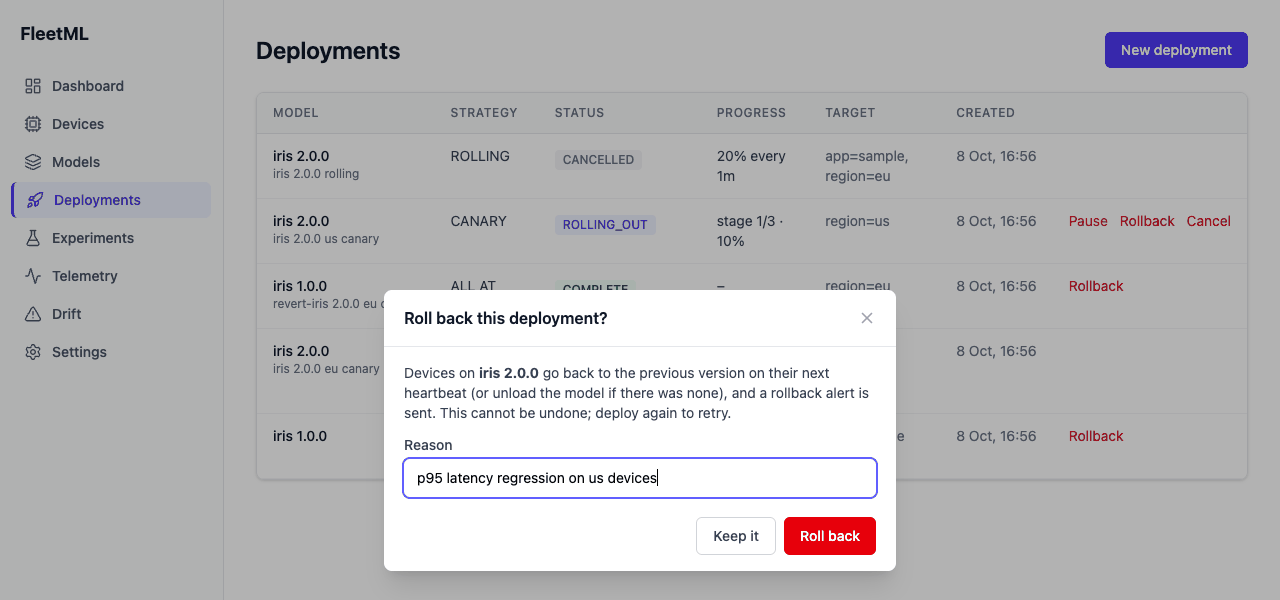
Rollback, cancel, one version per model. A manual rollback, also after completion, returns devices to the previous version, and the newest deployment wins. Rollouts
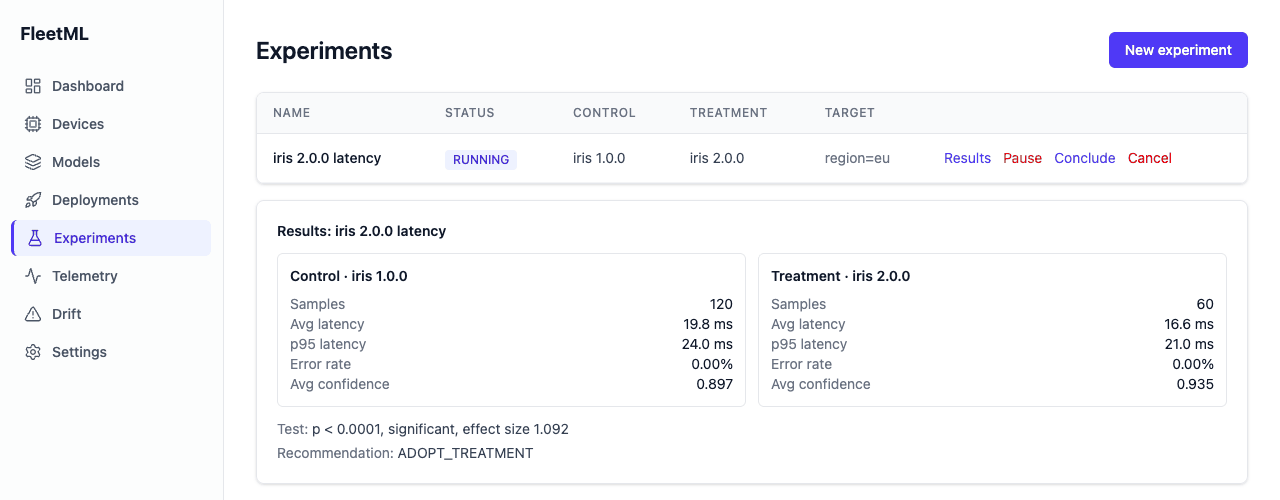
A/B experiments. Sticky cohorts, telemetry per arm, a fixed-horizon Welch t-test and a maximum duration. Tour step 4
Model registry with integrity checks. Uploads go straight to S3-compatible storage, and the server checks each file's sha256 and size before it can be deployed. Tour step 1
Variant selection. Each device gets a build it can run, chosen by OS runtime, RAM and capability score. Tour step 2
Artifact signing. Per-project ed25519 signatures, checked on the device before download, with keys that rotate with a grace period. Artifact signing
Delta updates. Devices with the previous version download only a delta: 440 KB for a 20 MB model with a retrained head. Delta updates
Alerts. Rollback and drift alerts on NATS and to signed webhooks, Slack and email, with retries and a delivery log. Alert sinks
Battery and data. Hourly background checks, batched telemetry, and downloads on unmetered networks or while charging unless urgent, all set from the server. Android, iOS
Roles and audit log. Viewer, operator and admin roles per project, and an audit log of every change and refused request. Architecture
Security. API keys with per-project roles, per-project enrollment keys, revocable device tokens, and devices confined to their project. SECURITY.md
Operations. Health probes, Prometheus metrics and a Grafana dashboard, with telemetry delivered at least once and stored once per event ID. Tour step 7
Dashboard and CLI. The dashboard runs on a desktop or a phone; the CLI has fleetml push, deploy, experiment, drift, and simulate for a fleet of simulated devices. Tour
The dashboard
Drift, experiments and rollbacks in the dashboard
Models, deployments, experiments, drift and alert sinks, with server-side login sessions, on a desktop or a phone. These are the repository's own screenshots.
FleetML · Drift
Drift: PSI per metric, the last day against the week before.
FleetML · Experiments
An A/B experiment: telemetry per arm, a Welch t-test and a recommendation.
FleetML · Deployments
A manual rollback: devices go back to the previous version on their next heartbeat.
How it works
One server, your devices, and a health gate on every staged rollout
Devices heartbeat with the models they run and receive assignments: what to load, update or unload, with presigned download URLs and their experiment arms. Three background loops advance rollouts through the health gate, evaluate experiments and check drift.
Architecture has the request paths, data model, device protocol and trust boundaries; Rollouts has the strategies, the health gate and the statistics.
Platforms
Install
Each snippet below is taken from the README or the guide it links when this page is built.
On Windows, Get started runs in the Ubuntu shell of WSL 2 with Docker Desktop, PowerShell runs the Windows CLI, and a Windows browser shows the dashboard: On Windows.
For pipelines and notebooks: pip install fleetml, then, from the root of the clone:
Python
import time
from fleetml import FleetML
fm = FleetML()  # the server and key from FLEETML_SERVER and FLEETML_API_KEY
p = fm.projects.create(f"pipeline-{time.strftime('%Y%m%d-%H%M%S')}")  # names are unique per server
v = fm.push("models/iris/iris_v1.tflite", project=p.id, model="iris", version="1.0.0")
fm.deployments.start(fm.deployments.create(p.id, v.id).id)
You run models on phones or edge devices and would otherwise build staged rollouts, rollback and drift monitoring yourself.
Your apps are Android (minSdk 26) or iOS (15 and later), or your machines run Linux on amd64 or arm64.
You keep your runtime: FleetML works with any model file, and your app runs the model with its own runtime.
You want it on your infrastructure: you run the server, its Postgres, NATS and object store yourself, with Docker Compose or the Helm chart, so your models and telemetry never leave it.
Not what it is
Not an inference runtime: your app or inference process keeps running the model with the runtime you already use.
Not a model trainer or converter: it starts from a file you already have, in any format.
Not a hosted service, and it does not terminate TLS itself: put its ports behind a TLS proxy before exposing them.
Trust
What you can check
Apache License 2.0
The server, SDKs, agent, CLI, dashboard and chart are in one public repository.
 FleetML